I love sitting with someone smarter than me and getting wisdom and knowledge from them. I got that opportunity today.
I met with the owner of a church management software company, one of the biggest in the U.S., for a couple of hours this morning and came away with some great nuggets.
Nugget #1: Be a constant learner - an oldie but continues to be a goodie
You know, if everyone who's brainy keeps saying it, it's probably something I need to be doing. I know often times I feel like I need to be constantly learning about what's important to my performance on the job. But, duh, I need to be a constant learner about a lot of things; God's ways, husband, parent, finances, home improvements, etc... (I'm kidding about home improvement).
Nugget #2: Avoid "tribal knowledge"
Ooh, I like this one. Tribal knowledge is something learned that doesn't get passed on to others. It's like department A figuring out something that departments B and C could benefit by knowing, but department A doesn't pass the info on. When people on the team don't get this info, they may end up re-inventing the wheel or making mistakes that could have been easily remedied. Instead of keeping the knowledge in the "tribe", I need to pass it on to other's who could and probably would benefit. Whether it's "re-inventing the wheel", making mistakes or a long learning curve for the "new guy", all these time wasting activities could be avoided by not keeping knowledge and wisdom just within the tribe.
So there you go, I glimpse into what goes into Wayne's brain.
Happy New Year!
Friday, January 2, 2009
Two Nuggets


Friday, February 8, 2008
A BIG All Staff Meeting
Every month, our church has an all staff meeting where everyone who's employed meets for about an hour as one big group. It's always fun and encouraging. Early this week, we had an extended all staff meeting where we met offsite for most of the day and it was wonderful. As a giant team, we had fun together, worshipped and prayed together, learned together and of course ate together.
Our jr. high student pastor, Josh Wintermute, summed it up perfectly, "It was truly a life giving event."
What about your team? Do you get a chance to pull everyone together a few times a year to encourage, fellowship, laugh and pray?
If your team is struggling with feelings that their environment is not life giving, take a chance and put this type of event on your calendar. Go ahead and get the process started of producing a life giving environment.
Wayne Geer
Church Staff 101
Wednesday, January 9, 2008
A Note to Pastors: Work Less
Scot Longyear has an eye opening post at the Worship.com blog containing some startling statistics about our profession, pastoring. He also includes a short list of practical to do's for a healthy leader.
Click to jump to the post, A Note to Pastors: Work Less.
It doesn't matter your ministry position, Church Staff 101 highly recommends reading Scot's post.
Also, take a moment and read my post, Taking a Break, about vacation, something Scot talks about in his post.
Wayne
Tuesday, January 1, 2008
Taking a Break
Ah, it's great to take a break. Hopefully you've noticed, no new posts for a couple of weeks here at Church Staff 101. My family along with my wife's extended family had the opportunity to vacation in-between Christmas and New Year skiing in New Mexico. We all had a wonderful time. The vacation and the time of year made me think about how important it is to take time away from work and spend time with family.
"Yeah, but I just wasn't able to take all my vacation days." I used to believe I didn't need to take time away from ministry work. As I've gotten older, I've realized a few absolutes:
- The work will still be there when I get back. Uh, yeah, it doesn't ever end.
- I'm not that important. President Bush has taken more vacation time than most other presidents. He's in charge of the COUNTRY, I'm sure what we are in charge of is going to make it without us for a week or two.
- Must recharge "batteries." I cannot continuously give without recharging. Actually, I can (and have) but productivity goes down the tube after a long stretch of no vacation.
"We believe in family here at so and so church." I'm confident every senior pastor, executive pastor and board or elders would say they care about family and want their staff to make it a priority. Reality check here, just because they say it, doesn't mean they believe it or practice it. In fact, it's not up to them to make sure I'm prioritizing my family. It's my job to put my family first, period. And so more absolutes:
- Contrary to movie stars and televangelists, if you lose your family, you've lost it all. Aside from God, what's more important?
- Bragging about being a workaholic and saying family is a priority are not compatible.
- It's totally up to me. I have to make it a priority and stick to my decisions. It's necessary to say "no" sometimes.
- Reminiscing about events and situations taking place with those closest to me are the best memories.
Take the time off, I really truly hope and believe you won't regret it.
Wayne
Thursday, December 20, 2007
Getting Things Done (GTD)
”The secret of getting ahead is getting started. The secret of getting started is breaking your complex overwhelming tasks into small manageable tasks, and then starting with the first one.“ - Mark Twain
Mr.Twain was definitely before his time when it came to getting things done. I'm sure we've all been in the same place, overwhelmed with "stuff" and thinking that working harder, faster and longer was going to get more done. In my life, that style of productivity has only led to more stress. So, here at Church Staff 101, I'm going to walk through a breakthrough (for me at least) method of getting things done. I've borrowed some ideas from the book of the same name by Mr. David Allen along with a brilliant web article titled, Getting Things Done in 60 Seconds.
I came across the idea of GTD through the website, Lifehacker. I was intrigued and started doing some research along with purchasing the book. GTD was an interesting read. The overall concepts of the book were appealing to me, it was the methodology that slowed me done. It was then I found the website article. These two pieces enabled me to put into place my system of GTD; a system I've been using for almost eight months and has improved my productivity with lowering my stress load.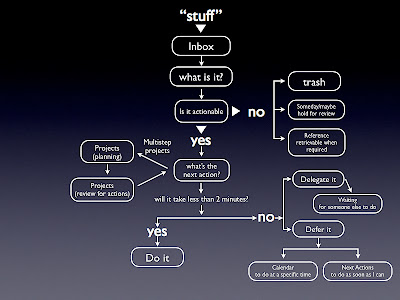
Yep, that's it. This pic is actually my desktop pic. I know, "Dork!" But it's a great reminder of what I need to do.
Stuff - is all the stuff I need to get done. Everything I can think of, lists I already have, new ideas, etc...
Inbox - I do use my Entourage (Mac version of Outlook) inbox as the central place for all to do items. Emails sent to me, emails I've sent to myself and Jotts all park themselves in my inbox. I do empty my inbox daily by sending all items into one of six folders; projects, someday, this month, this week, today, waiting on someone and trash.
Is it actionable - I ask this for every item every day and depending on the answer, I'm routed to the next step. I have found the "two minute rule" to be a lifesaver. I really had no idea how quickly I could work through stuff realizing if I could get it done in two minutes, then I needed to just do it.
Projects - I categorize to do items into subfolders here. For instance, a VBS item gets placed in a VBS folder here if it's not actionable right now.
Delegate it - I am blessed to have an awesome team around me. Casey and Brandon are easy to delegate to because I know they'll get it done.
Calendar - this is a future post, but Google Calendar is the BOMB!
And lastly, here's a six step plan to help you set up your own GTD.
6 Steps to GTD
- Read the book. You can purchase it right on this website. Read the parts that will apply to you.
- Online research. Google search "getting things done." Check out the article Getting Things Done in 60 Seconds.
- Implement your system.
- Stick to the rules. Determine to follow your rules.
- Don’t beat yourself up if you slip. We all slip up, no problem, just get back in the groove. Also, ask yourself why you slipped up. Maybe you need to tweak your system because it's not fitting you.
- Plan how you’re going to spend your extra time.
”Those who make the worst use of their time are the first to complain of its shortness.“ - Jean de la Bruysre
Wayne Geer
Thursday, December 6, 2007
Jott Update
This just in from Jott.com:
"We’ve been working hard on the official release of the Google Calendar Jott Link, and we’re happy to announce it’s finally here. Why is this cool? Because you can now create a Google Calendar event in a single step, from anywhere, simply using your voice. Just call Jott, say “Google Calendar”, and then the time of the event and what it’s about….and you’re done. We’ll take your voice, convert it to text, and insert it into your calendar for you. “Meet Cathy at 9 am next Thursday” is no longer a to do that needs another step, it’s something that’s recorded in your Calendar."
I'm really excited about this new release for the Google Calendar Jott Link. I've seen other work-arounds to get Jott to send an event to my Google calendar, but this route is much easier.
I posted about Jott a while back (Jott). It's a great way to not have to take notes or try to remember items, just use your cell phone.
Wayne
Tuesday, November 6, 2007
Jott
I used to carry a pda device and a cell phone. The pda was used for a handful of applications I thought were super important. Eventually I got to the point that I was using it only for taking notes. The problem was that I either had to "type" the note then sync to get it to my computer, or I had to rely on the "handwritten" note using the pda software and hope that the pda didn't turn on in my pocket and my latest note destroyed by pocket scratchings.
And let me tell you, taking notes on my cell phone was a beating! It didn't matter what entry method I used, it was not efficient. I also had the great idea to use my cell phone to record notes as voice recordings. The problem was that it was never easy to remember to check all the voice recordings every day. And then when I did listen to them, well, I then had to transcribe them, two steps to get one note. Duh!
Ah, Jott to the rescue! Jott is a free online service that has saved my bacon! Here's how it works in real life. I'm driving and think about something important, like I need to remember to tell my assistant to purchase roller ball pens. I have Jott set up as a speed dial on my cell phone, number 7 actually. I speed dial Jott, the computer voice asks "Who do you want to Jott?" and I say, "Myself." I then speak the note, "Tell assistant to purchase roller ball pens." Computer voice says, "I got it." I hang up. Jott then transcribes what I just said and emails it to me! I now have the note in my inbox and I don't have to spend any time or energy trying to remember it. So simple.
Jott can be set up to send your note to any email address as well as your note can be sent to any cell phone as a text message. With Jott you don't ever have to go through the mental gymnastics of trying to remember what that super important note was you've now forgotten. It's truly an amazing free product.
Check it out at Jott.com and let me know what you think.
Wayne


